disclaimer / info
- DISCLAIMER:
THIS IS EXPERIMENTAL SOFTWARE AND HARDWARE. USE AT YOUR OWN RISK. THE MAINTAINER(S) OF THESE PAGES AND THE DEVELOPER(S) OF SOFTWARE AND HARDWARE PRESENTED ON THESE PAGES CAN NOT BE HELD LIABLE UNDER ANY CIRCUMSTANCES FOR DAMAGE TO HARDWARE OR SOFTWARE, LOST DATA, OR OTHER DIRECT OR INDIRECT DAMAGE RESULTING FROM THE USE OF THIS SOFTWARE OR HARDWARE. IF YOU DO NOT AGREE TO THESE CONDITIONS, YOU ARE NOT PERMITTED TO USE OR FURTHER DISTRIBUTE THIS SOFTWARE OR TO USE ANY TEMPLATES FOR BUILDING HARDWARE PRESENTED HERE.
- this page deals with customisable wiring of displays and user options for drivers included in
serdisplib
- i'm not responsible for the content of external web pages
- external web pages will generally open in separate browser windows or tabs
- english is not my native language. please keep that in mind (corrections of english grammar and formulations are very welcome!)
- email: mrwastl at users.sourceforge.net
passing options when initialising a driver in serdisplib
intro
- starting with version 1.95 options may be set in serdisplib.
an option is a key-value pair, more options can be combined using semi-colons as separators.
the resulting option string is passed to serdisplib using the third parameter of the init-function serdisp_init().
eg.: serdisp_init(sdcd, "PCD8544", "WIRING=1;INVERT=YES");
definition
- an option string is defined using the following notation:
  OPTIONSTRING := OPTION { ';' OPTION }
  OPTION       := WIRINGOPT | KEYVALUE
  KEYVALUE     := OPTIDENT '=' OPTVALUE
  OPTIDENT     := /* driver specific option identifiers */
  OPTVALUE     := /* driver specific values or defines */
  WIRINGOPT    := ( 'WIRING' | 'WIRE' ) '=' WIRINGDEF
  WIRINGDEF    := /* one of: identifier, numeric id or a customisable wiring
                  (section '-> customisable wiring in serdisplib') */
annotations:
- identifiers and values are case insensitive (eg.:
"wiring=powerlcd" == "WIRING=PowerLCD")
- whitespaces are ignored (valid:
" wiring = powerlcd ; INVERT =yes ")
- some identifiers may have short forms, some values textual aliases (eg.:
"width=128" == "w=128", "invert=1" == "inv=yes")
- identifiers and corresponding values and aliases are driver specific and can be found in the driver hardware pages (menu item 'passing options')
customisable wiring in serdisplib
intro
- starting with version 1.95 serdisplib supports customisable wiring.
a wiring definition may be either an identifier, a numeric id, or a string containing key-value pairs for maximum flexibility.
examples:
  "WIRING=PowerLCD"
  "WIRING=1"
  "WIRING=DATA8,CS:nAUTO,A0:INIT,WR:nSTRB,RD:nSELIN"
the first two ways to define a wiring (identifier and number) are listed in the section above, this section deals with the third way to do so: a string containing key-value pairs. using this, a user defined wiring can be 'composed'.
definition
- a customisable wiring is defined using the following notation:
  CUSTWIRING := [ DATABUS ',' ] DISPSIG ':' IODEVSIGID { ',' DISPSIG ':' IODEVSIGID }
  DATABUS    := 'DATA8'
  DISPSIG    := '1' | DISPSIGID
  IODEVSIGID := /* signal names defined for a certain IO-device */
  DISPSIGID  := /* individual - depends on display used */
annotations:
DATABUS defines a data bus using 4, 8, 16, ... wires. thus, DATA8 means, that D0 - D7 is used for an 8 wire bus.
for now, only DATA8 is defined.
a DATABUS-definition has to be at the beginning of the definition string! DISPSIG either defines an identifier of a display signal - DISPSIGID (eg: CS) or 1 which means that the corresponding I/O device signal is permanently high (== 1). IODEVSIGID defines an identifier of an I/O device (eg: nAUTO).
I/O device signal identifuers are dependend on the I/O device used! DISPSIGID defines an identifier of a display signal (eg: CS). display signal identifiers are dependend on the display used! - active-low vs. hardware-invertion clashes are solved self-acting by serdisplib!
eg: display signal CS is active-high but wired to parallel port signal D0 which is not hardware-inverted: serdisplib solves the invertion needed automatically.
example 1:
- custom wiring for a parallel driven display:
- pinout:
    D0 - D7 .. data bus
         CS .. chip select (active low)
         A0 .. command or data
         WR .. write strobe (active low)
         RD .. read signal (active low)
      RESET .. reset signal (active low)
- reset signal
RESET is hard wired to a R/C reset circuit and thus needs not to be in the wiring string
- display will be connected to a parallel port, it's signal identifiers are listed in a section below
D0 - D7 define a data bus, so DATA8 is used. D0 needs to be wired to pin 2 (D0), D1 to pin 3 (D1), a.s.o. CS is wired to pin 14, thus one of nAUTO, nAUTOFD, nLINEFD, or C1 may be used as identifier A0 is wired to pin 16 –> INIT WR is wired to pin 1 –> nSTRB RD is wired to pin 17 –> nSELIN - active low vs. hardware inverted parallel port signals are solved by serdisplib
- putting all this together:
DATA8,CS:nAUTO,A0:INIT,WR:nSTRB,RD:nSELIN
example 2:
- custom wiring for a serial driven display:
- pinout:
         SI .. serial data input
        SCL .. clock
         DC .. command or data
         CS .. chip select (active low)
      RESET .. reset signal (active low)
CS is hard wired to GND (chip always selected) SI is wired to pin 1 –> nSTRB SCL is wired to pin 14 –> nLINEFD (or nAUTO, ...) DC is wired to pin 2 –> D0 RESET is wired to pin 3 –> D1 - pins 4 and 5 are used to supply the display with power –> they need to be permanently high (==1), so
1:D2 and 1:D3 is used
- clashes 'active low vs. hardware inverted parallel port signals' (e.g.:
RESET is active low, but D1 is not hardware inverted) are solved by serdisplib, thus a user doesn't need to care about this
- putting all this together:
1:D2,1:D3,SI:nSTRB,SCL:nLINEFD,DC:D0,RESET:D1
parallel port
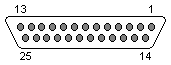
dsub 25 connector (pc view)
| pin # | defined identifiers in serdisplib | hardware inverted | direction | description |
| 1 | C0, nSTROBE, nSTRB | * | —> | strobe |
| 2 | D0 | | <–> | data bit 0 (bi-directional) |
| 3 | D1 | | <–> | data bit 1 |
| 4 | D2 | | <–> | data bit 2 |
| 5 | D3 | | <–> | data bit 3 |
| 6 | D4 | | <–> | data bit 4 |
| 7 | D5 | | <–> | data bit 5 |
| 8 | D6 | | <–> | data bit 6 |
| 9 | D7 | | <–> | data bit 7 |
| 10 | S6, ACK, ACKNOWLEDGE | | <— | acknowledge |
| 11 | S7, nBUSY | * | <— | busy |
| 12 | S5, PE, PERROR | | <— | paper end |
| 13 | S4, SELECT, SLCT | | <— | select |
| 14 | C1, nLINEFD, nAUTO, nAUTOFD | * | —> | autofeed |
| 15 | S3, ERROR | | <— | error |
| 16 | C2, INIT | | —> | initialise |
| 17 | C3, nSELECT, nSELIN, nSEL | * | —> | select in |
| 18-25 | — | | -— | GND (ground) |
links
history
| 2012-01-28 | transferred to doxygen-based part of documentation |
| 2005-05-09 | first release |